

Archived website feature: This article and its screenshots describe the former website report, including its Results, printing and repeat-practice controls. The website Record and History pages have been retired. The instructions below are historical, not a promise that these controls exist in the mobile app. For current practice, visit the Spekero app page. The app requires an account; transcription and AI coaching require a subscription and your permission. Old browser reports are not automatically transferred to the app.
The former Spekero website could do more than show a transcript. It could turn your recording into a personalised English improvement report that helps you understand what you said, how to improve it, and how to practise better next time.
Instead of only seeing your original spoken words, you can also review clearer versions of what you said. This makes it easier to notice weak sentence structure, unclear wording, or ideas that make sense in your head but do not come out clearly when spoken.
A good report does not just show mistakes. It helps you understand your speaking patterns, recognise what you tend to struggle with, and focus on what to improve next. That is what makes this feature useful for real speaking practice, not just one-time feedback.
The English improvement report can include corrected English, a more natural version, a professional version, and a list of improvements. Together, these help you compare your original speech with stronger versions while keeping your original meaning.
What the former report included
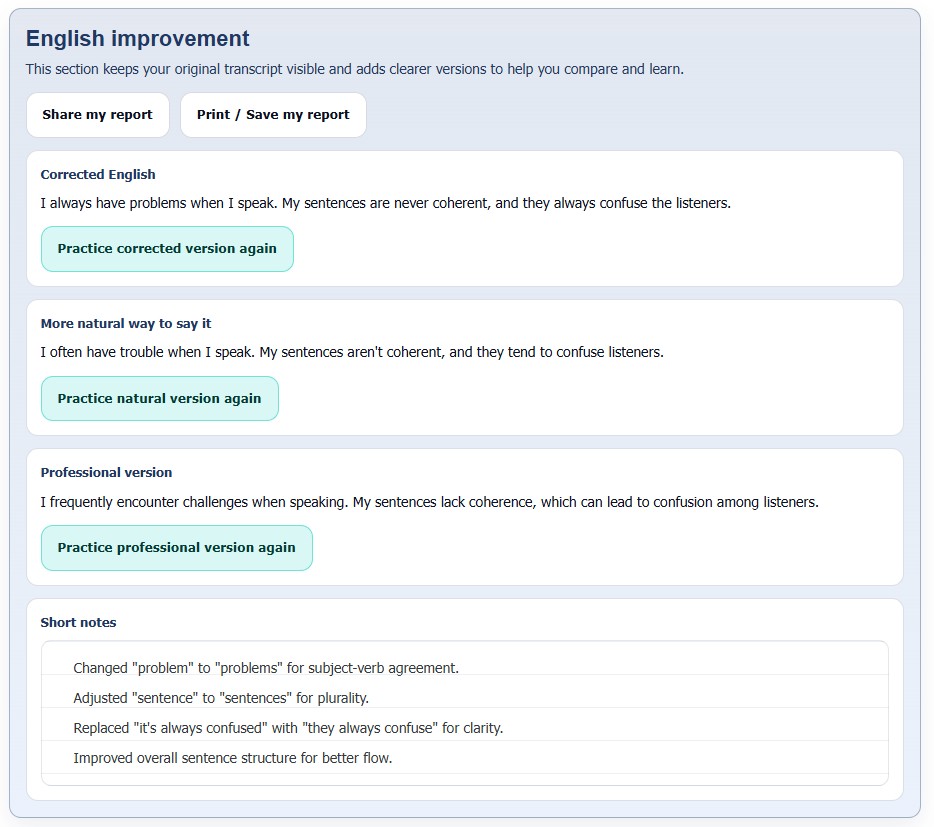
How each version helps
Corrected English helps fix grammar, sentence structure, and wording while keeping the original meaning. This is useful when your sentence is understandable but still sounds incomplete, awkward, or slightly incorrect.
The natural version shows how the same idea could sound smoother in everyday English. This is especially useful if your speaking feels too direct, too literal, or influenced by the way you first formed the sentence in your mind.
The professional version is useful when you want a more polished tone for work, presentations, meetings, interviews, or formal communication. It helps you keep the same message while sounding clearer, calmer, and more professional.
A list of improvements give extra value because they explain the changes in a simple way. Instead of only seeing a better version, you can also understand why the sentence was improved. Over time, this helps you notice repeating habits in your own speech.
The former website workflow
This section describes the retired website recorder, not the current mobile app. For current speaking practice, visit the Spekero app page. The former recorder let you speak naturally, answer a question, read a short script, or practise with a tongue twister. It also allowed users to type their intended statement before recording to compare it with the transcription.
Before uploading, users could turn on English improvement and select corrected English, a more natural version, a professional tone and short notes. These were options in the retired website.
The former Results page let users review their report and compare the versions side by side. This made it easier to understand what changed and which version helps you most. For some people, the corrected version is most useful. For others, the natural or professional version gives the biggest improvement.
The former repeat-practice control sent users back to the recording interface and filled the text box with the selected version. That website workflow is no longer available; use the app page to check current practice options.
Printing and sharing in the former website
The former website let users print the English improvement report or save it as a PDF. An existing saved copy can still be useful if you want to review your speaking later, keep study materials, or build your own speaking improvement folder over time.
You can share an existing saved copy with a teacher, mentor, friend, or colleague. That makes the feature more useful if you want outside feedback instead of keeping everything private. It also helps if you want to show your progress more clearly over time.
Why this becomes a practical learning tool
A simple way to use this feature is to record yourself, review the report, choose the improved version that helps you most, and then practise that version again. This turns the tool into a practical speaking loop rather than a one-time analysis.
If you often struggle to express your ideas clearly, this feature can be especially useful. It helps you move from what you actually said to a better version you can reuse. That is what makes the English improvement report more than just feedback. It becomes a practical learning tool you can return to again and again.
You can also keep your reports as part of your own learning history. When you look back over time, it becomes easier to notice repeated weaknesses, recognise progress, and understand how your speaking is improving. This can be motivating because it gives you something real to measure, not just a feeling that you may or may not be improving.
References
- Harvard Division of Continuing Education (2023) 10 Tips for Improving Your Public Speaking Skills. Available at: https://professional.dce.harvard.edu/blog/10-tips-for-improving-your-public-speaking-skills/.
- Toastmasters International (n.d.) Public Speaking Tips. Available at: https://www.toastmasters.org/resources/public-speaking-tips.
- Centers for Disease Control and Prevention (2025) Plain Language Materials & Resources. Available at: https://www.cdc.gov/health-literacy/php/develop-materials/plain-language.html.
- Cambridge English (n.d.) Activities for Learners: Pronunciation. Available at: https://www.cambridgeenglish.org/learning-english/activities-for-learners/?skill=pronunciation.